


Every time a browser or a crawler asks a server for a page, the server answers with a three digit number before it sends anything else. A 200 means here is the page. A 404 means there is nothing at this address. A 500 means something broke on our side. The 3xx family is the one that says the thing you asked for lives somewhere else, and here is where to go.
That sounds simple, and most of the time it is. The reason redirects get so much attention in SEO is that they are the plumbing under every site move, every URL cleanup, every HTTP to HTTPS switch and every trailing slash decision anyone has ever argued about. Get them right and nobody notices. Get them wrong and you can lose rankings on pages that are still perfectly good.
I want to be clear about one thing up front, because a lot of audit tools do not make it clear. A 3xx response is not an error. My site crawler flags them in orange next to broken links, which makes people treat them as damage to be repaired. They are not. A redirect is how the web handles change. What causes trouble is redirecting badly, and that is a much smaller and much more fixable problem.
What Are 3xx Status Codes?
A 3xx status code is a server telling the client that further action is needed to complete the request. In almost every case that action is automatic. The server sends the code together with a Location header holding the new address, and the browser fetches that address without the visitor noticing anything except a slightly longer wait.
Here is what a redirect looks like on the wire:
GET /old-post HTTP/1.1
Host: example.com

HTTP/1.1 301 Moved Permanently
Location: https://example.com/new-post/
The browser then makes a second request, this time to /new-post/, and gets the 200 and the actual page. Two requests, one visible page.
Search engines do the same thing, with one extra step. They also record what the redirect means. Google’s documentation says a 301 is used as “a strong signal that the redirect target should be processed”, while a 302 is only “a weak signal”. That difference is the whole reason SEOs care which number you send.
Common Types of 3xx Status Codes
There are more 3xx codes than most people need. The ones that matter in practice are these.
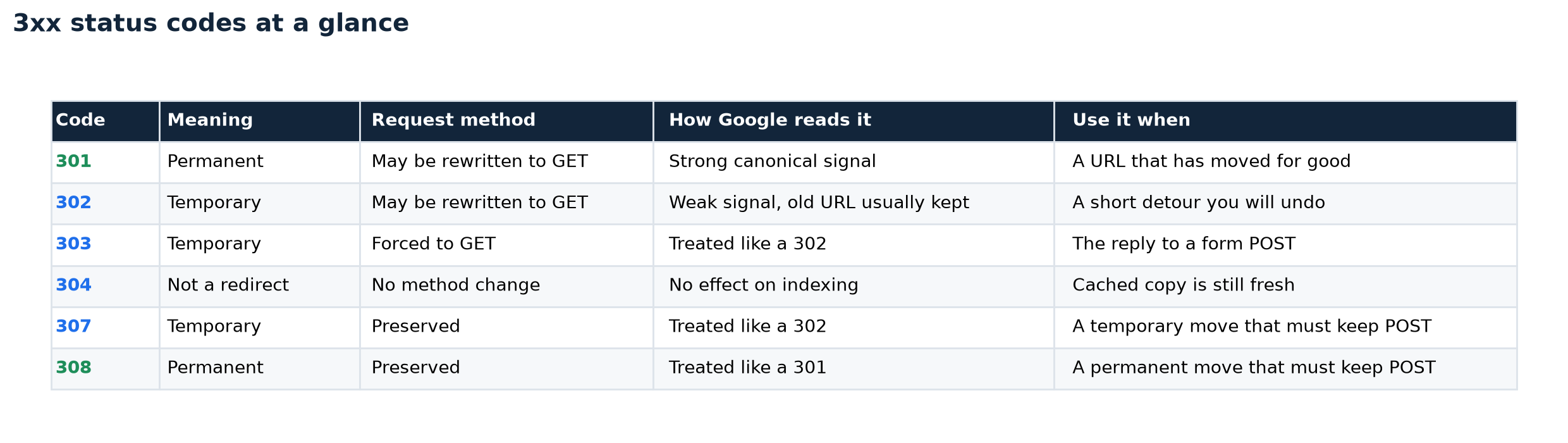
301 Moved Permanently
The workhorse. RFC 9110 defines it as a resource that “has been assigned a new permanent URI and any future references to this resource ought to use one of the enclosed URIs”. You use it when a URL is not coming back: a renamed post, a merged category, a domain change, a switch to HTTPS.
Google treats a 301 as a strong signal that the new URL should become the canonical one. Browsers cache it aggressively, which is worth remembering if you ever set one by mistake, because your own browser will keep following it long after you have removed it.
302 Found
Temporary. The original URL is still the real one, and you plan to bring it back. Google follows a 302 but keeps treating the old URL as the canonical candidate, which is exactly what you want for a genuinely temporary situation and exactly what you do not want for a permanent move.
303 See Other
Almost invisible to SEO and quite useful in application code. It is the polite reply to a form submission: the browser sent a POST, the server processed it, and 303 tells the browser to go and fetch the result page with a GET instead. That is what stops a page refresh from resubmitting an order. Google treats it the way it treats a 302.
307 Temporary Redirect
A 302 with the ambiguity removed. With 301 and 302, clients have historically been allowed to rewrite a POST into a GET when they follow the redirect. With 307 the spec says the user agent “MUST NOT change the request method”. If you are redirecting anything other than a plain page view, 307 is the safer temporary code.
308 Permanent Redirect
The same fix applied to permanent moves. Same meaning as a 301, same treatment from Google, and the request method is preserved. For a straightforward content site, 301 and 308 are interchangeable in SEO terms. For an API or anything that accepts POST requests, 308 is the correct one.
300 Multiple Choices
Included for completeness. It means the resource has several representations and the client may pick one. I have never had to configure one, and it did not appear once in the sample I measured for this article.
304 Not Modified
Not a redirect at all, and it belongs in this list only because its number starts with a three. A 304 answers a conditional request: the client says here is the version I already have, and the server says nothing has changed, keep using it. No Location header, no body, no new page. Google’s own documentation says the indexing pipeline may recalculate signals for the URL, but that otherwise the status code “has no effect on indexing”. Seeing lots of 304s in your logs is a sign that caching is working, not that something is wrong.
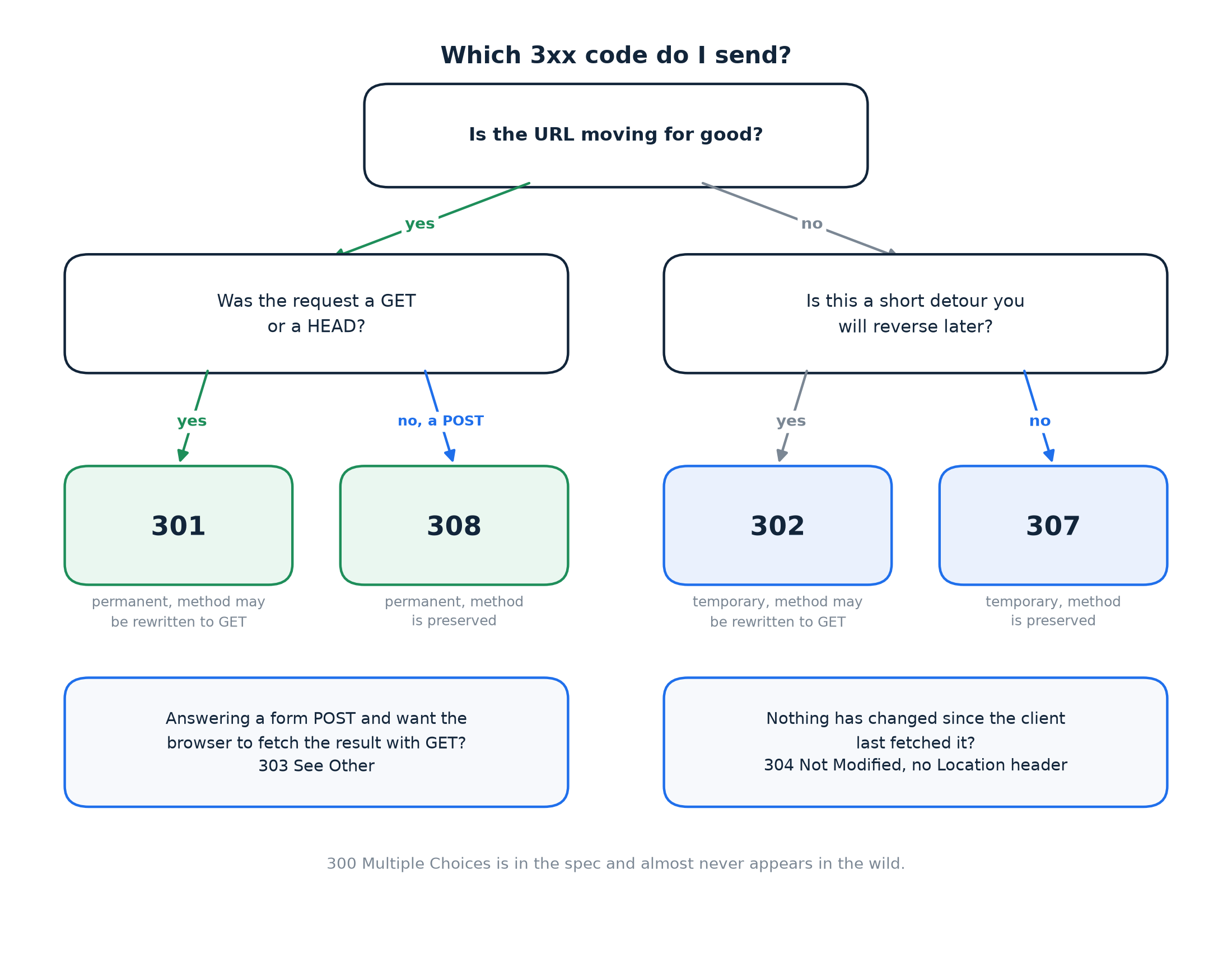
If you want a shortcut for picking one, this is the whole decision in a single picture.
SEO Impact of 3xx Redirects
Permanent redirects consolidate signals, temporary ones do not
This is the single most important thing to understand. When you 301 an old URL to a new one, Google treats the target as canonical and the old page’s history flows to it. When you 302, it does not, and the old URL keeps sitting in the index as the version Google prefers. Do that on a permanent move and you end up with the old URL ranking, the new URL ignored, and no obvious error anywhere to tell you why.
The related fear, that redirects bleed link value, is out of date. Google’s Gary Illyes said in July 2016 that “30x redirects don’t lose PageRank anymore”. You do not lose equity by redirecting correctly. You lose it by redirecting to the wrong place, or by using the wrong code.
Crawling and redirect hops
Google’s crawlers follow up to 10 redirect hops before they give up. Anything past that limit simply does not get fetched, and the content at the end of the chain is invisible.
Ten sounds like plenty, and it is until a few reasonable rules stack on top of each other. HTTP to HTTPS is one hop. Non-www to www is another. A trailing slash rule is a third. An old URL structure from a redesign is a fourth. Each of those is defensible on its own, and together they can eat half the budget before anyone has touched a single post.
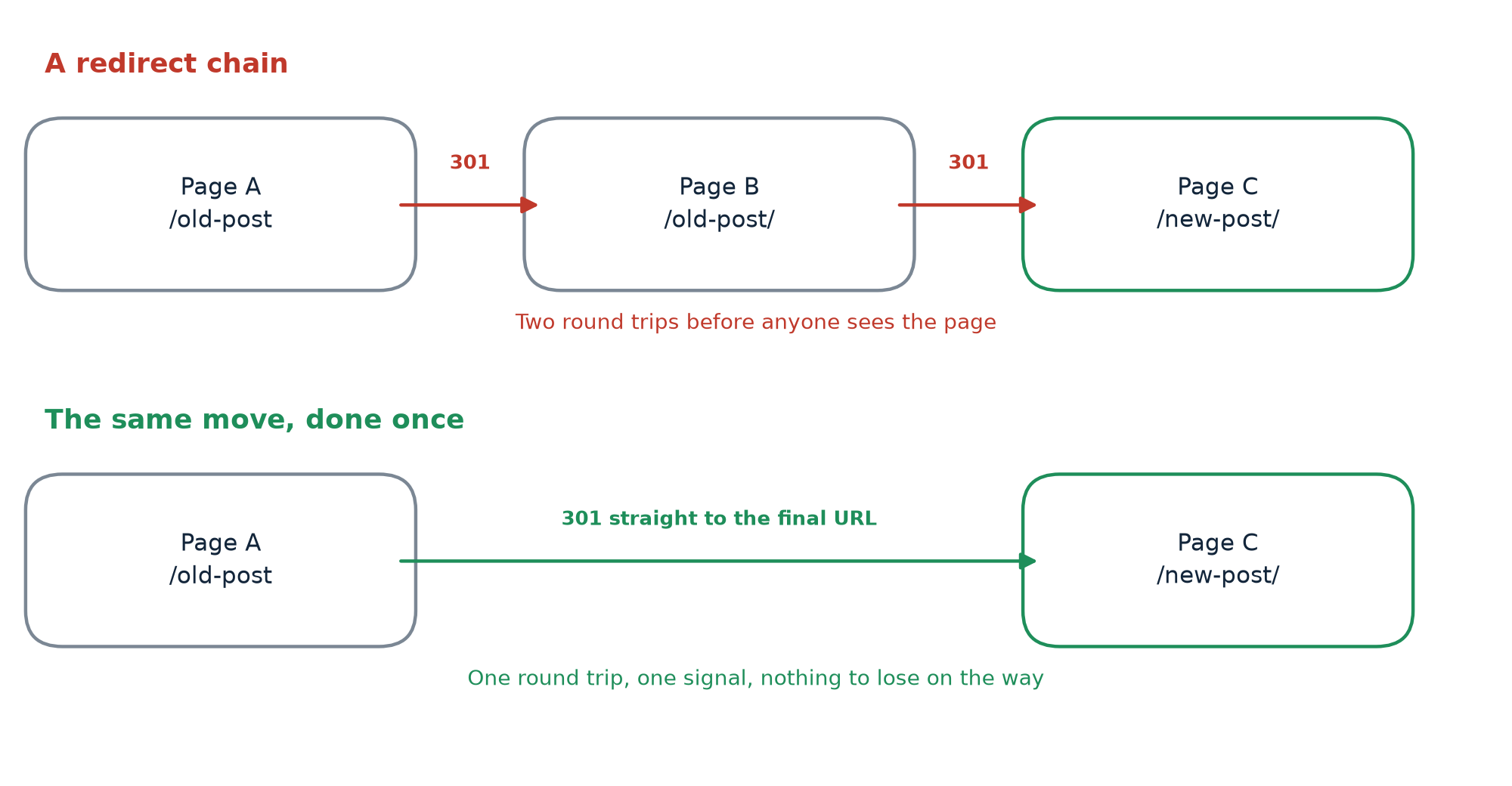
Redirect chains
A chain is what you get when a redirect points at a URL that itself redirects. Page A sends you to Page B, and Page B sends you to Page C. It works, and it is wasteful. Google’s crawl budget guidance is blunt about it: “Avoid long redirect chains, which have a negative effect on crawling.” The site move documentation recommends redirecting to the final destination directly and keeping any chain to no more than three or so hops.
Chains are almost never designed. They accumulate. Somebody sets a redirect in 2023, somebody else moves the target in 2024 without checking what pointed at it, and now there is a chain nobody knows about.
I ran a check while writing this. I requested the home page of 149 well known domains over plain HTTP and followed every hop to the end. Of the 109 that answered cleanly, 107 redirected at least once, 60 of them went through two or more hops, and 11 went through three or more. The longest chain was six hops, on a major scientific publisher. Chains at that scale are not a small site problem.
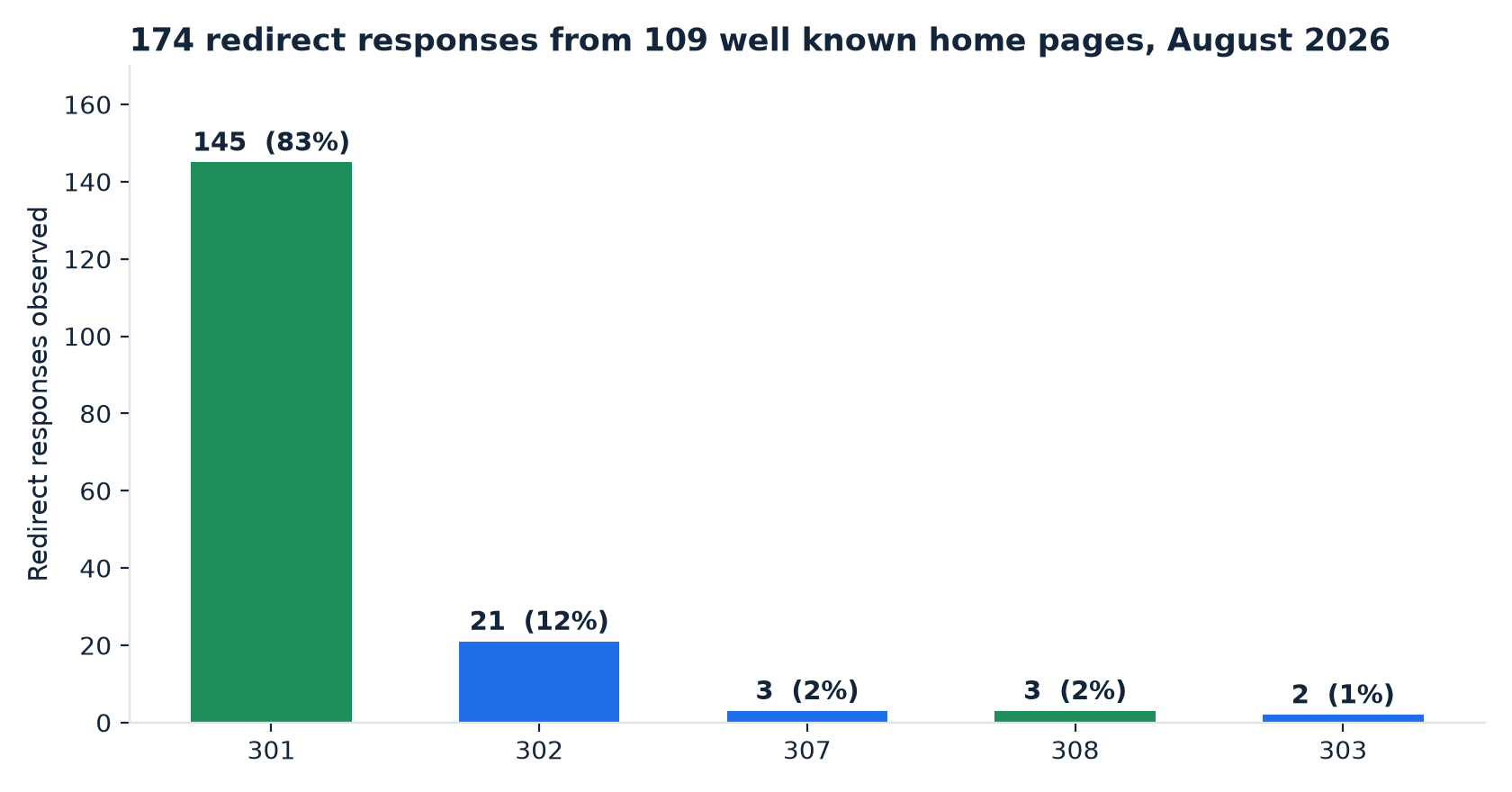
The same sample tells you something about which codes people actually use. Out of 174 redirect responses, 145 were 301s, 21 were 302s, and 307, 308 and 303 accounted for eight between them. The permanent redirect is the default the web has settled on, and the modern method preserving codes have barely made a dent.
Redirect loops
A loop is a chain that closes. A points to B, B points back to A, and the browser gives up with a message about too many redirects. The page is completely inaccessible to visitors and to crawlers. Loops usually come from two systems each trying to be helpful, most often a CMS canonical rule fighting a server or CDN rule about slashes or case.
Internal links pointing at redirected URLs
If your own navigation links to a URL that redirects, every visitor and every crawler pays for that hop on every visit. It is the easiest of these problems to fix and the one most often left alone, because the site works. Google’s site move guide asks you to update internal links to the new URLs as soon as the move begins. Screaming Frog’s own guidance on redirect chains says the same thing: fix the source so it points at the final destination, and make sure internal links send people and crawlers straight there rather than through a series of hops.
Page speed
Each redirect is a full round trip before the browser has a single byte of the page. Lighthouse’s redirect audit puts the cost at “hundreds of milliseconds” per hop, and it fails a page that has two or more of them. On a fast connection that is annoying. On mobile, on a slow network, with a DNS lookup and a TLS handshake at the far end, it is the difference between a page that feels quick and one that does not.
Common 3xx Redirect Mistakes
Using a 302 when you mean a 301. The most common one, and often not even a decision. Several plugins and frameworks issue 302 by default, so the code you get is the code somebody else chose.
Building chains without noticing. Every time you move a URL, check what already points at it and repoint those redirects at the new destination too.
Creating loops with competing rules. If two systems both enforce a canonical form of a URL, sooner or later they will disagree. Keep redirect logic in one place.
Redirecting everything to the homepage. Tempting during a migration, because it clears the 404 report. It is a poor experience, and Google’s site move guide says outright that you should not redirect many old URLs to one irrelevant destination such as the new home page, because it confuses people and may be treated as a soft 404. A soft 404 passes nothing, so you get the worst of both. Redirect to the closest matching page, and let genuinely dead pages return a 404.
Leaving internal links pointing at old URLs. Redirects are for other people’s links. Yours you can fix.
Forgetting redirects during a migration. The one that costs the most. New site goes live, old URLs return 404, and rankings built over years disappear in a fortnight. Google recommends keeping migration redirects in place “for as long as possible, generally at least 1 year”, which is a good sign of how long the old URLs keep mattering. This kind of avoidable damage sits alongside the other common SEO mistakes that quietly cost sites their rankings.
How to Fix 3xx SEO Issues
The process is the same whether you have 40 pages or 40,000.
- Crawl the site. Screaming Frog, Sitebulb, Semrush, whatever you already use. Let it follow redirects rather than stopping at the first hop.
- List every URL returning a 3xx. Include the source of each link, because that is what you will edit.
- Find the chains and the loops. Screaming Frog’s Redirect Chains report does this in one export, and the loops are worth fixing before anything else since those pages are unreachable.
- Check that each redirect is the right kind. Permanent moves get 301 or 308. Only genuinely temporary ones get 302 or 307.
- Update internal links to the final URL. Navigation, in body links, sitemaps, canonical tags, hreflang.
- Flatten the chains. Point every old URL straight at the final destination, and check the destination is relevant.
- Recrawl and verify. Then watch Search Console for the following few weeks. Coverage and average position on the affected URLs are what tell you it worked, and it helps to know which of your tools reports what before you go looking for the change.
One habit worth building: whenever you change a URL, run the old one through a header check before you move on. curl -sIL https://example.com/old-url prints every hop and its status code in a couple of seconds and has caught more of my own mistakes than any dashboard.
FAQs
Are 3xx status codes bad for SEO?
No. A correctly implemented redirect is how you keep the value of a URL when its address changes. What hurts is the wrong code, a chain, a loop, or a redirect to a page that has nothing to do with what the visitor asked for.
What is the difference between a 301 and a 302?
A 301 says the move is permanent, and Google treats the new URL as the one that should be indexed. A 302 says it is temporary, and Google keeps the old URL as the preferred version. Use 301 unless you genuinely intend to switch back.
Do 301 redirects pass SEO value?
Yes. Google confirmed in 2016 that 30x redirects do not lose PageRank. The value follows the redirect, provided the target is a relevant page and not a generic homepage.
What is a redirect chain?
Two or more redirects in a row before the browser reaches a real page. Google follows up to 10 hops, but each one costs time and crawl budget, so point old URLs at the final destination instead.
How do I find 3xx redirects on my website?
Crawl the site with a tool that reports redirect chains, such as Screaming Frog or Semrush Site Audit. For a single URL, curl -sIL <url> on the command line shows every hop. Search Console’s Pages report will also show you URLs excluded because of a redirect.
Conclusion
Redirects are not a problem to be eliminated. They are the mechanism that lets a site change without breaking the links pointing at it, and a site that never redirects anything is usually a site that never improves anything.
What matters is small and learnable. Send permanent codes for permanent moves and temporary ones for temporary moves. Point old URLs straight at their final destination instead of letting hops accumulate. Keep your own internal links pointing at URLs that answer with a 200. Redirect to the page a visitor actually wanted rather than to the front door.
Add a redirect check to your regular technical audit rather than saving it for migrations. Chains and loops arrive quietly, between projects, from decisions that each looked harmless. A crawl every quarter catches them while they are still one hop deep.
Sources
- Google Search Central, Redirects and Google Search: https://developers.google.com/search/docs/crawling-indexing/301-redirects
- Google Search Central, Site moves with URL changes: https://developers.google.com/search/docs/crawling-indexing/site-move-with-url-changes
- The redirect measurements in this article are my own, taken on 28 August 2026.